
Questions this guide answers
Why can't I move the stage or the bar in a venue's layout?
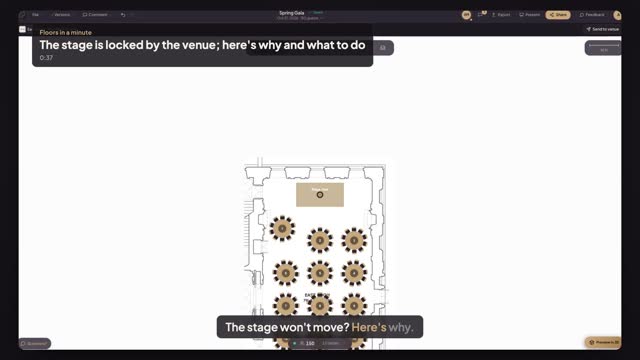
The venue locked them in its house setup, usually because they are built in or fixed for power and service. Click the item and the panel says Locked by venue and explains it. Everything else in the room, like tables and chairs, stays free to move for your event.
How do I ask the venue to move a locked item?
Click the locked item and press Ask the venue. A comment box opens pinned on that item; type your question and post it. The venue team sees it when you press Send to venue, which gives them comment access to your plan so they can answer right there.
Can I move tables in a venue's house setup?
Yes. When you start from a venue's setup you get your own copy of the room with its tables and chairs. Drag, add or remove tables as your event needs; only the items the venue locked stay put. Your changes never touch the venue's published setup.
Transcript
The stage won't move? Here's why.
Alex plans the Spring Gala in The White House's East Room.
Drag the stage riser. It stays where the venue put it.
Click it. The panel says Locked by venue, and why.
Tables and chairs are yours. Drag a table where you want it.
Need the stage moved? Click it, press Ask the venue and type your question.
Your question is pinned on the stage. The venue sees it once you send.
Next: ask the venue about any spot on the plan.