Your event space, in 3D.
Ready in 3 minutes.
The floorplan tool that event professionals actually use. Drag, drop, walk through in 3D — share with a link.
No credit card required.

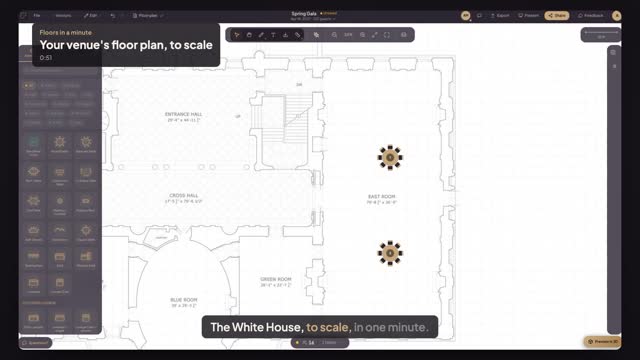
See it in under a minute
Your first floor plan, before you sign up
Real product, real venue, no narration fluff — then do it yourself.

Walk through before the day arrives
- Photorealistic materials — wood, glass, fabric
- Any mood: golden hour, candlelit, bright studio
- Shareable link — no app download needed
Built for your world
Venue & Hotel
Turn your space into a proposal that closes deals. Upload a panorama photo and clients see the 3D layout inside your actual room — not a generic background.
Wedding & Event Planner
Show clients the day before the day. Design the seating chart, present in 3D, and get sign-off — all from one link.
AV & Production
Get everyone on the same page, literally. Plan speaker placement, cable runs, and stage position — all to real-world scale.
Switching from another tool?
Running a venue?
See your actual space in 3D — not a demo room. Book a free 15-minute walkthrough and we'll set it up with your floor plan.
Built for every event professional
Plans that match how you work
Designing someone else's event? Pay per event. Running a venue? One flat monthly plan, no per-event charges, and your planners work free in your room. Either way, share stunning 3D floor plans your clients can actually walk through.
Starter
Try it. No card needed.
- 1 active event
- Full 2D layout tools
- Share link (watermarked)
- Unlock any event for $39
- 10 min of free editing to try it
Pay Per Event
One event, start to finish.
- Unlimited editing of that event
- The 3D walkthrough
- PDF and PNG exports without a watermark
- 10 Realistic 3D models from your photos
Planning more? 3 events · $79
Planner Pro
For planners who live in floors.live.
- 5 events a month · 3D models included
- 3D walkthrough + custom elements
- Custom branding
- 2-seat collaboration
- 10 saved templates
- Priority email support
Planner Studio
High-volume studios & agencies.
- 15 events a month · 3D models included
- Everything in Pro
- 5-seat collaboration
- Unlimited templates
- Priority support
Enterprise
White-label, API & SSO for agencies.
- Unlimited events
- White-label
- API access
- SSO / SAML
- Dedicated AM
- SLA guarantee
No contracts · Cancel anytime · Switch plans at any time
Realistic 3D models from your photos — included
Upload a photo, get a 3D model. Models are saved to your library and reused for free.Basic shapes: free · Pay per event: 10 Realistic models included with each event · Planner Pro & Studio: 3D models included every month
Got questions? We've got answers.
Is Floors.live really free?
Yes. All tools and features are free, and your account includes 10 minutes of free editing to try the editor. You only pay when you want to keep working on an event. No credit card required, no trial period.
How is this different from AllSeated or Social Tables?
Those tools cost $100–500/month, require lengthy onboarding, and lock you into annual contracts. Floors.live is free to start, takes 30 seconds to sign up, and your first floorplan can be done in minutes. Plus, your clients don't need an account to view or comment.
Can my clients see the floorplan without signing up?
Absolutely. Just share the link. They can view the layout, see guest assignments, and leave comments — all without creating an account. It's one of our most loved features.
What can I export?
Print-ready PDFs (A4 or Letter) and high-resolution PNGs (2x quality, transparent background). Exports include your event details, capacity breakdown, and a professional scale bar. Unlock the event for clean exports without the Floors.live watermark.
Is my data safe?
Your data is encrypted in transit (SSL) and at rest. We use Google Cloud infrastructure (Firebase) with enterprise-grade security. We never sell your data, and you can export or delete it at any time.
How much free editing time do I get?
Your account includes 10 minutes of free editing in total, to try the editor. When you want to keep going, unlock the event for $39 and edit it as much as you like.
Try it free. No credit card.
All tools included. Start designing your first event in the next 5 minutes.
Start for Free