
Questions this guide answers
How do I send my plan to the venue for approval?
In an event started from a venue's setup or booking, press Send to venue in the editor header, add an optional note and press Send. The venue team gets it under Plans to review, and a pill on your plan says Sent to the venue and waiting until they answer.
Can the venue change my floor plan after I send it?
No. Sending gives the venue team comment access only: they can view the plan, pin comments, approve it or ask for changes, but they can't move or edit anything. The event stays yours, and you keep editing it as before.
How do I know the venue approved my plan?
The pill in your editor header turns green and reads Approved by the venue. Open it to see who approved and when, with their note if they left one. If they ask for changes instead, the pill says Changes requested and a Send again button appears.
Transcript
Send the final plan to the venue. Get it approved.
Alex finished the Spring Gala in The White House's East Room.
Press Send to venue. The venue can comment and approve, but not edit.
Add a note and press Send. The pill says it's waiting.
On their side, The White House team reviews it and presses Approve.
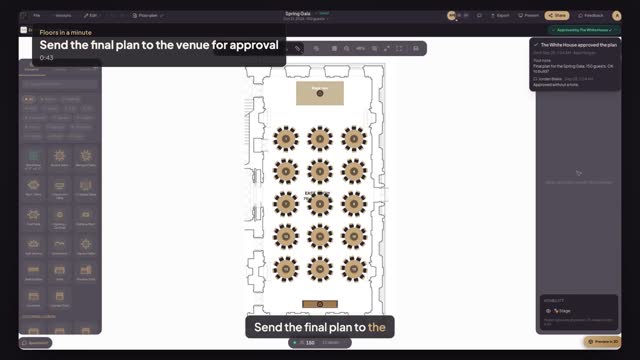
Back in Alex's plan, a note says The White House approved it.
The pill is green now: Approved. Open it to see who and when.
You and the venue now build from the same approved plan.
Next: share the plan with your client.