
Questions this guide answers
How do I print place cards from my seating plan?
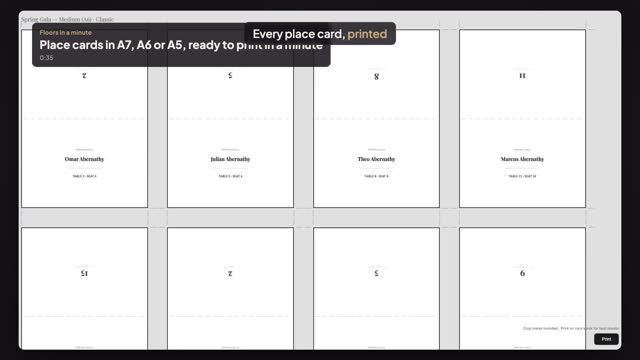
Seat your guests, then in Seating Mode press Export and choose Tent Cards (Folded). Pick a size and a style and press Open Print Preview. You get one folded card per seated guest, with name, table and seat, a fold line and crop marks, ready for your browser's Print.
What sizes and styles are there?
Three sizes when folded: Small (A7, 74 × 52 mm), Medium (A6, 105 × 74 mm) and Large (A5, 148 × 105 mm). Four styles: Elegant, Classic, Modern and Gala, a dark card. You can turn the event name, seat number and dietary notes on or off.
Who gets a card?
Only guests with a seat. Guests you haven't placed yet are left out, so seat everyone first. The same Export menu prints name badges and a per-table Table Breakout sheet for your caterer, and downloads the guest list or seating chart as a spreadsheet.
Transcript
Every place card, printed from your seating plan.
Alex's gala is seated: a hundred and fifty guests.
In Seating Mode, press Export, then Tent Cards.
Pick a size, A7, A6 or A5, and a style.
Press Open Print Preview. One card for every seated guest, with table and seat.
Fold line and crop marks included. Print on card stock and fold.
Next: check guests in at the door.