
Questions this guide answers
How do I line objects up with something that stays put?
Select the objects, then Shift-click the one that should not move, such as a column: it becomes the anchor. Press an Align button and the others move to it while the anchor stays where it is. The badge above the buttons says To anchor or To selection, so you always know which one you are using.
Why align them to each other first?
With an anchor, the selection moves as one block. Straighten the row first with To selection, then align the straight row to the anchor, and every table lands on the line. It takes two clicks instead of one, and nothing ends up off the line.
Can I space them evenly too?
Yes. With three or more selected, Space evenly spreads them so the centres are the same distance apart. Do it before the anchor step, while the row is still selected on its own. The spacing stays the same when you align the row to the column afterwards.
Transcript
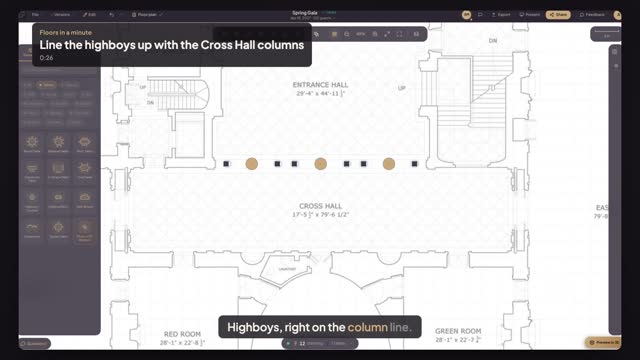
Highboys, right on the column line.
The Cross Hall highboys are close to the columns, but ragged.
Drag across the highboys, then press Align top.
Shift-click a column. It becomes the anchor.
Press Align center vertically. The whole row lands on the column line.
Straight, on the line, and nothing else moved.
Next: no chairs on the ends of the banquet rows.