
Questions this guide answers
How do I check whether a column blocks a table's view?
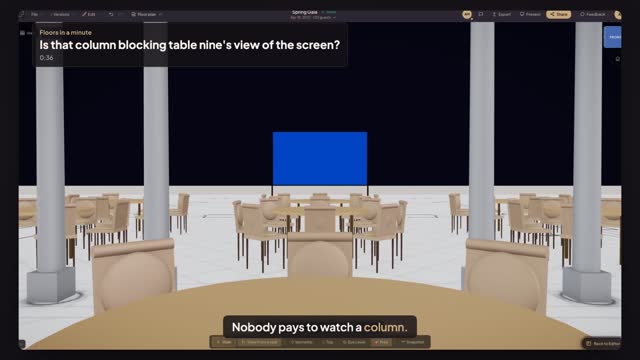
Put the room's columns on the plan, then open Preview in 3D and press View from a seat. Click a chair at the table: the camera sits at a seated guest's eye height and looks at the screen. If a column stands across it, you see it at once.
What do I do when a table's view is blocked?
Go back to the editor and move the table until the seat looks between the columns, usually to the middle of the bay. Then open the 3D view and sit in the same chair again. A few feet along the hall is often enough to clear the whole screen.
Does Floors work out the blocked seats for me?
No. View from a seat shows you what one chair sees, so you check the tables you are worried about one at a time: those behind columns, at the sides and in the back row. Save the view to show the client the seat they asked about.
Transcript
Nobody pays to watch a column.
Dinner in the Entrance Hall, four more tables behind the Cross Hall's columns.
Open Preview in 3D and press View from a seat.
Click a chair at table nine. A column stands right across the screen.
Go Back to Editor and drag table nine seven feet along the hall.
Open Preview in 3D, press View from a seat, and click the same chair.
Table nine sees the whole screen, between the columns.
Next: check the back row over the stage.