
Questions this guide answers
How do I check the view from the back row?
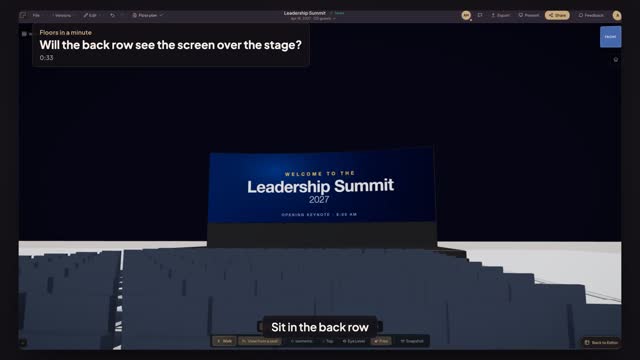
Click any chair in the back row and press View from this seat. Floors.live puts the camera at a seated guest's eye height, looking at the stage, so you see exactly what that guest sees: the lectern, the heads in front and how much of the screen is left above them.
What do I change if the back row can't see the bottom of the screen?
Raise the screen or lower what blocks it. Give a ground-stacked LED wall a taller riser, fly it with more bottom clearance, move the lectern to one side or lower the stage. After each change, press View from this seat again and check the same chair.
Is seated eye height different from standing?
Yes, by about a foot and a half. A seated adult's eyes are close to four feet off the floor and a standing guest's are over five feet. Always check a seated event from seated height, because that is where the heads in front cover the most screen.
Transcript
Sit in the back row before anyone else does.
Two hundred seats face the summit stage. Check the last row.
Open Preview in 3D, choose Isometric to see every row, and press View from a seat.
Click a chair in the last row. You sit there, at a seated guest's eye height.
Seated is the default. Standing shows the view from the back of the room.
Checked from the worst seat in the house, before load-in.
Next: walk your client in from their own seat.