
Questions this guide answers
How do I make a delay screen show the same content as the main wall?
Place a second LED wall, then under Content source choose Mirror LED wall. It follows the main wall, including the slide you uploaded there, so you change the content once. Give it the main wall's shape, the same panel count at a smaller Module Size, so the whole picture shows.
Why is my mirrored screen cutting off the edges of the slide?
A mirrored screen fills itself with the main wall's picture, so a screen of a different shape crops it. Match the shape: use the main wall's panel count with a smaller Module Size. If the shapes must differ, set Fit to Contain to show the whole picture with bars.
How do I check that the back row can read the screen?
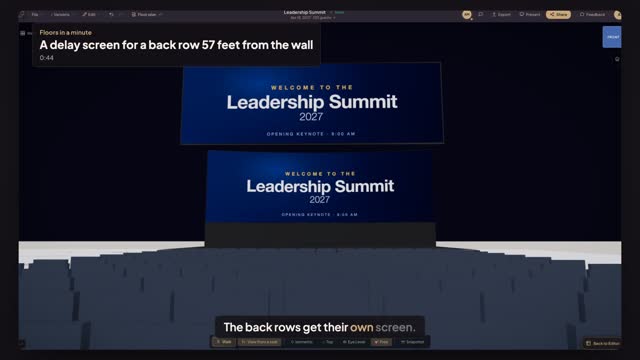
Open Preview in 3D, press View from a seat and click a chair in the last row. The camera sits at a seated guest's eye height, facing the stage. You see the main wall and the delay screens as that guest will, and you can switch to Standing as well.
Transcript
The back rows get their own screen.
Fifteen rows face the summit wall in a seventy-nine-foot room. How far is the last?
Press M. Click the main wall, then the last row. Fifty-seven feet.
Open AV, pick LED Wall and click above row five.
Type nineteen by six, the main wall's own panel count, and halve the Module Size.
Choose Flown, nine and a half feet of Bottom clearance, and Mirror LED wall. Same shape: nothing cropped.
Open Preview in 3D, press View from a seat and click the last row.
The whole slide, edge to edge, close enough to read from the last row.
Next: hang the LED wall high enough.