
Questions this guide answers
How do I add a flown lighting truss?
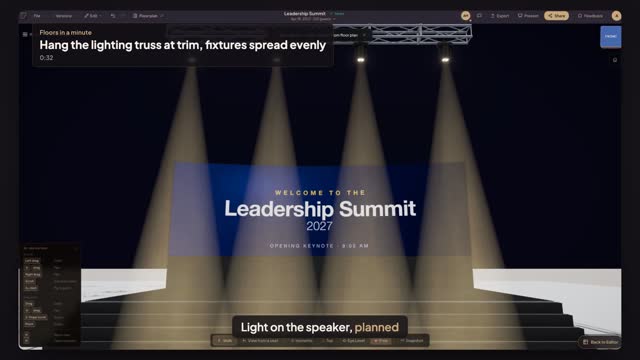
Open AV in the library and pick Hung Truss, then click where it hangs. In Properties add sections until it reaches the length you need and set Trim Height, the height of the truss above the floor. The 3D view shows it flown at that height over the room.
How do I put lights on a truss?
Select the truss and add fixtures in its Fixtures section: moving heads, washes, PAR cans or LED bars. Press Spread evenly to space them along the truss, then set tilt and pan per fixture. On the higher quality settings the 3D view shows each fixture's beam.
Does Floors calculate truss loads or motor points?
No. Floors places the truss, its length, trim height and fixtures so everyone sees the design. Rigging loads, motor points and bridles still come from your rigger and the venue's engineer; mark the pick points on the plan with labels if the venue asks for them.
Transcript
Light on the speaker, planned before the rigger arrives.
The stage and LED wall are in. Now the downstage light truss.
Open AV, pick Hung Truss, and click just in front of the stage.
Press plus three times for about twenty feet of truss, then set Trim Height to twenty feet.
Add four moving heads, then press Spread evenly.
Four heads at trim, and the stage lit before anyone climbs.
Next: put front of house on the center line.