
Questions this guide answers
How do I get an equipment list from my plan?
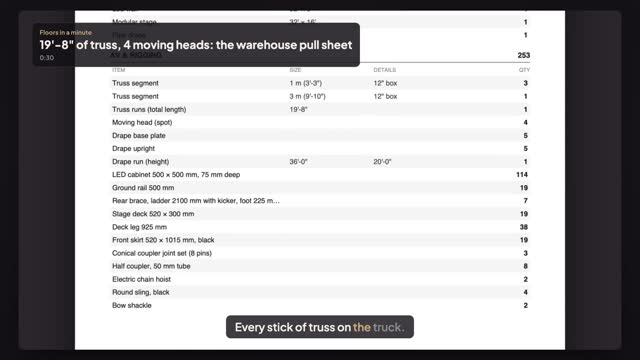
Press Export in the editor and, under Counts, choose Counts (PDF) for a printable sheet or Counts (CSV) for a spreadsheet. The sheet lists what is on the plan by type, including the AV and rigging lines: truss, fixtures, LED wall, drape and stage decks.
Does the sheet add up the truss?
Yes. Hung truss is listed with its segments and the total run, and the fixtures on it are counted by type, so the warehouse can pull sticks and moving heads from one page. Check corner blocks, clamps and motors yourself; the sheet counts what is drawn.
Can I open the counts in a spreadsheet?
Yes. Counts (CSV) downloads the same lines as a file that opens in Excel, Numbers or Google Sheets. Use it to add stock codes, case counts and truck space, or to merge several rooms into one pull list for the whole show.
Transcript
Every stick of truss on the truck.
The summit rig is on the plan: truss, moving heads, LED wall and drape.
Press Export.
Under Counts, press Counts (PDF). Counts (CSV) opens in a spreadsheet.
Four truss segments, nineteen feet eight of run, four moving heads, two chain hoists, thirty-six feet of drape.
One sheet for the warehouse, counted from the plan itself.
Next: pin the measurements the crew will check.