
Questions this guide answers
How do I show a lighting look in 3D?
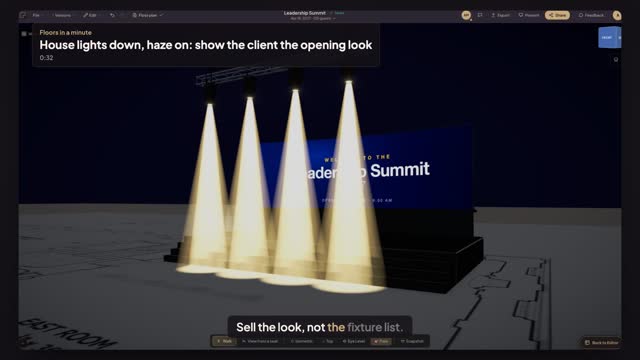
Open Preview in 3D and press Atmosphere. Under the daylight presets are three indoor looks, Walk-in, Show and Reveal, each a setting of House lights and Haze. Press Show and the room darkens while the beams from your fixtures come up.
Why can't I see the beams from my moving heads?
Beams read against haze and a dark room. Open Atmosphere, drag House lights down and Haze up: with the house lights near zero and the haze above half, each fixture's beam shows all the way from the truss to the stage floor.
Is the look saved with the plan?
Yes. House lights and Haze are saved with the plan like the other Atmosphere settings, so the link you share opens in the same look. Take a snapshot from the 3D view when you want a still for the proposal.
Transcript
Sell the look, not the fixture list.
Four moving heads hang over the summit stage. The client has only seen a plan.
Open Preview in 3D, then press Atmosphere.
Press Show. The house lights drop and the beams come up.
Drag House lights down to seven percent and Haze up to eighty-two.
The opening look, before a single fixture is hung.
Next: a 4K still for the proposal.