
Questions this guide answers
Can I put my floor plans on my venue's website?
Yes, with Venue Pro. Open Share & embed, pick a space under Embed on your website and press Copy. Paste the snippet into any page: it adds a Plan this space button that opens your real room, to scale, in an overlay on your site. An inline iframe version is there too.
What do visitors see when they press the embed button?
Your room on its measured plan, with Start from chips for a blank room and each published house setup. They pick one, move tables and chairs, and press Save to my account when they want to keep it. Your locked items stay fixed, and planners design free in your room.
Does the embed update when I change my setups?
Yes. The embed loads your space and published setups live, so a setup you update or publish shows up on your website without new code. Starter is $49 a month for one space; Pro is $79 and includes the embed, analytics and the booking calendar. Every plan starts with a 30-day free trial.
Transcript
Your real rooms, planned right on your own website.
The White House has a website. Let's put the East Room on it.
Open Share and embed. Under Embed on your website, pick the East Room.
Keep the button and press Copy. Paste it into any page of your site.
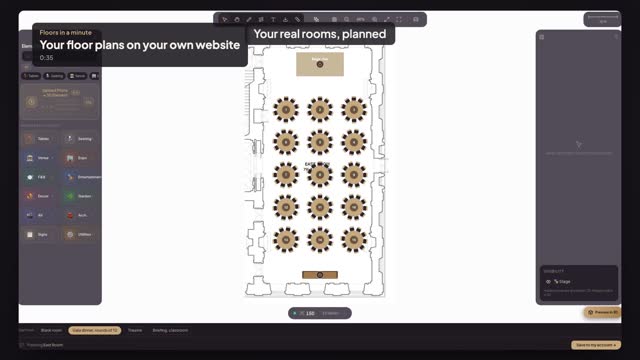
Press Live preview. This is what opens when a visitor presses your button.
Your East Room, to scale. They start from your gala dinner setup.
Fifteen tables, your locked stage, on your website. No sign-up to start.
Next: every booking on its date.