
Questions this guide answers
Does Floors.live have a booking calendar for venues?
Yes, in Venue Pro. Open Bookings and press Calendar: every booking sits on its date, coloured by room, in Month or Week view. Enquiries and invitations show dashed, so you can tell a confirmed event from a request at a glance.
How do I see which room is booked when?
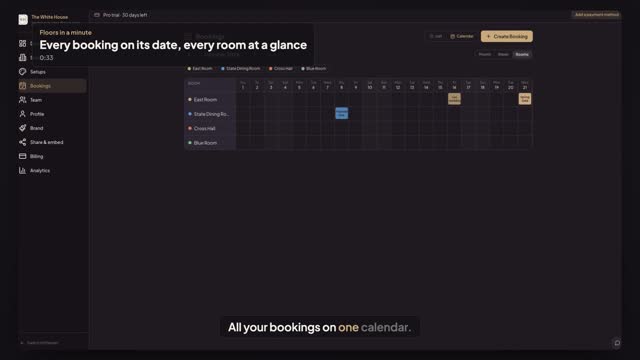
In Bookings → Calendar, press Rooms. Each event space is a row and each day of the month a column, so you see who's in which room. Hide a room with its chip in the legend, and click any booking to open its details.
How do I add a booking from the calendar?
Click an empty day, or a room's empty day in Rooms. Create Booking opens with the date and room filled in; pick a house setup, add the client's email and the event name and press Create Booking. The client gets a link to plan in your room. Pro is $79 a month, with a 30-day free trial.
Transcript
All your bookings on one calendar.
The White House has three events coming up. Here's where they live.
Open Bookings and press Calendar. Each event sits on its date, coloured by room.
Press Rooms. Every room is a row, so you see who's in which room.
Click an empty day in the East Room. The date and room are filled in.
Pick the gala setup, add the client and press Create Booking.
The Lee wedding is in the East Room. Morgan gets a link to plan it.
Next: invite your coordinator.