
Questions this guide answers
Can planners ask for a date on my venue page?
Yes. Every published venue page has a Check a date card: the planner picks a date, a guest count and a room, sees whether it's usually available, adds a name, email and message and presses Request this date. No account is needed, and the request lands in your Bookings.
Where do date enquiries from my venue page go?
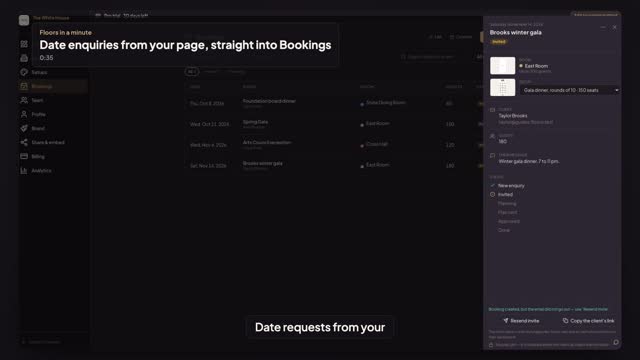
To Bookings in the venue portal. A banner counts the new enquiries, and each one is a row with the date, the room, the guest count and the status New enquiry. Open it to see the planner's contact details and message, then invite them or decline.
How do I turn an enquiry into a booking?
Open the enquiry in Bookings. In Invite them to plan, name the event, check the room, pick one of your house setups and press Send invite. The planner gets an email link to plan in your room, starting from that setup, and the booking moves to Invited.
Transcript
Date requests from your page, straight to Bookings.
Taylor plans events and just found your venue page.
In Check a date, Taylor picks November fourteenth, a hundred eighty guests, the East Room.
Then a name, an email and a message. Press Request this date.
Jordan, at the venue, opens Bookings. There it is: a New enquiry.
Open it, name the event, pick the gala setup and press Send invite.
Taylor is invited to plan in your East Room, from your gala setup.
Next: plans come to you for review.