
Questions this guide answers
How do I fill my layout with people?
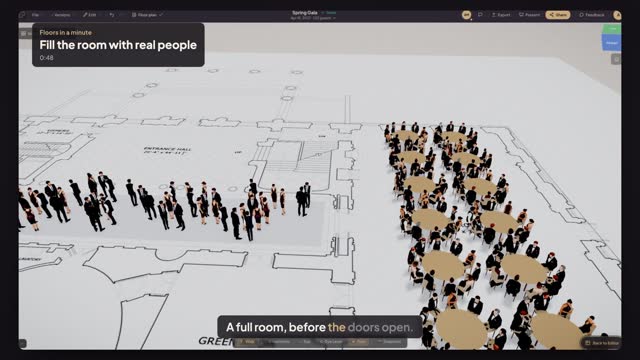
Select the tables or seating rows, or press Command A to select them all. In Properties, under Populate with people, pick a dress code and press Populate. Every chair gets a seated 3D person, each one different. Re-roll mixes the crowd, Fill empty only keeps the people already seated, and Clear empties the chairs.
Which dress codes can I show?
Business Formal, Business Casual, Cocktail, Evening or black-tie, Casual, Waitstaff, Security and Hi-Vis. Each has men, women and neutral figures at real height. Seated guests come from Populate with people; standing guests fill a drawn area, and single figures such as waiters or security come from the People library.
Can I show a standing reception crowd?
Yes. Draw a rectangle or ellipse over the reception area, or select a dance floor or carpet. In Properties, under Standing guests, pick Light, Mingling or Packed, or type a guest count, choose a dress code and press Fill with standing guests. The crowd stands in small groups, clear of tables, walls and the stage.
Transcript
A full room, before the doors open.
The Spring Gala tables are set. Now seat the guests.
Press Command A to select every table. Under Populate with people, pick Evening / Black-tie.
Press Populate. A hundred and twenty guests take their seats, every one different.
Now the cocktail reception in the Cross Hall. Pick Rectangle, draw across the hall and click it.
Under Standing guests, pick Mingling and Cocktail. Press Fill with standing guests.
Open Preview in 3D and fly in low. Real people, dressed for the evening.
Guests at every table and a full reception, at true size.
Next: share it with your client.