
Questions this guide answers
Can I use an exact colour for the tablecloths?
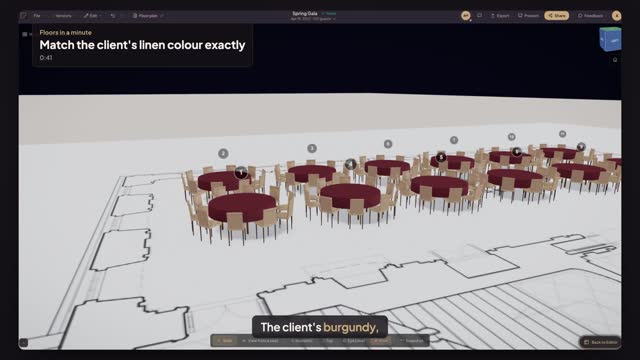
Yes. Select a table, turn on Tablecloth and click the colour code next to the swatches. Type the hex code from the client's swatch card, for example 7A2E3A, and press Enter. The cloth in the plan and in 3D takes that exact colour.
How do I apply the same linen to every table?
Dress one table first, then press Copy table design. Press Command A to select every table and press Paste from table 1. The cloth colour, drop length, centerpiece and dining set all copy across to every selected table in one step.
Can I change the chair colour too?
Yes. Select a table and set Chair colour in its properties; until you do, the chairs follow the table's colour. Chair style is set per table too: Chiavari, Crossback, Folding or Ghost. Match the linen first, then pick the chair style and colour that match the rental.
Transcript
The client's burgundy, not the nearest swatch.
The client sent a linen swatch card: burgundy, code 7A2E3A.
Click table 1. Turn on Tablecloth and click the colour code.
Type 7A2E3A and press Enter. The cloth turns the client's burgundy.
Press Copy table design, then Command A and Paste from table 1.
Open Preview in 3D and check the colour across the whole room.
Every table in the client's own colour, before the linen order.
Next: a 4K still for the proposal.