
Questions this guide answers
How do I dress a table with a tablecloth, centerpiece and place settings?
Click the table and use the Properties panel. Turn on Tablecloth, choose a color and drag Drop Length to floor length. Under Accessories, open Centerpieces to pick a design and size, and Dining Set to add plates, cutlery, glassware and a charger plate. Under Chair Style, pick chiavari, crossback, folding or ghost chairs.
Can I copy one table's design to all the other tables?
Yes. Dress one table, then press Copy table design in its Properties panel. Select the tables you want, or press Command A (Ctrl A on Windows) to select them all, and press Paste from. The tablecloth, centerpiece and dining set are applied to every selected table in one click.
Where can I see the tablecloths and centerpieces?
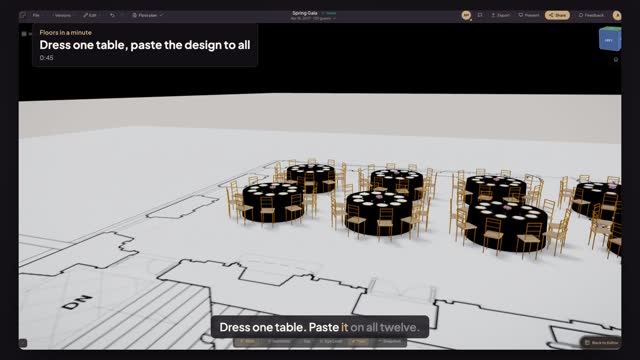
Open Preview in 3D. The floor plan shows the place settings from above, while the 3D view shows the whole design: cloth color and drop, centerpieces, plates, glasses and chair style, all at true size. Fly in close to a table to show your client exactly how the room will look.
Transcript
Dress one table. Paste it on all twelve.
The Spring Gala tables are set. Now dress them for the evening.
Click table 1. Turn on Tablecloth, pick Navy, and drag it to the floor.
Open Centerpieces: Roses, large. Then Dining set: Formal, with a Charger plate.
Under Chair Style, pick Chiavari. Then press Copy table design.
Press Command A to select every table, then Paste from table 1.
Open Preview in 3D. Every table wears the same design.
One table dressed, twelve tables done, ready for your client.
Next: turn your own centerpiece into 3D.