
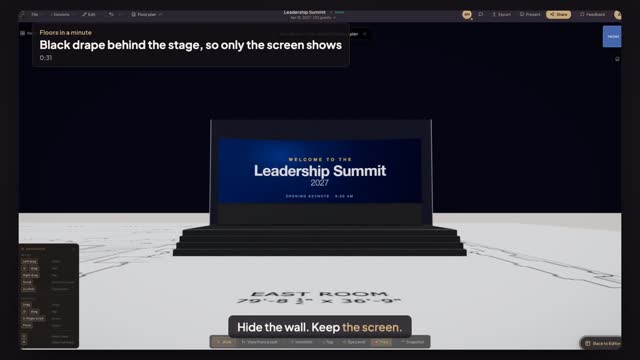
Questions this guide answers
How do I add pipe and drape behind a stage?
Search pipe in the library and pick Stage Curtain, or another preset such as Ceremony Backdrop. Click where the run starts, then set Total Width and Upright Height in Properties. On a plan in feet both fields are in feet, and the drape stands at that height in the 3D view.
How tall should masking drape be?
Taller than whatever it hides and taller than the top edge of the screen in front of it, so the audience never sees over it. Sixteen feet is a common height behind a flown LED wall. Set Upright Height on the drape, then check the sight line from the back of the room in 3D.
Why can't I find Pipe & Drape in the library groups?
Pipe & Drape lives in the Expo group, which only appears for expo and conference events or plans that already have booths. Search always finds it: type pipe or drape in the library search box and pick the preset you want, such as Stage Curtain or Room Perimeter.
Transcript
Hide the wall. Keep the screen.
Around the LED wall, the East Room's back wall is still in view.
Search pipe, pick Pipe & Drape, and click just behind the stage.
Choose the Stage Curtain preset, then set Total Width to thirty-six feet, wall to wall.
Set Upright Height to twenty feet, taller than the LED wall's top edge.
Black from wall to wall. Every eye goes to the screen.
Next: hang the lighting truss at trim.