
Questions this guide answers
How high should the bottom of a projection screen be?
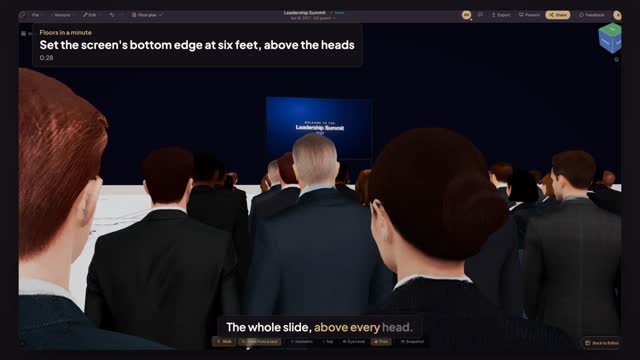
Four feet is the usual minimum for a seated audience; on a flat floor eight rows deep, six feet is what clears the heads from the back row. Click the screen and type the height in Bottom edge; on a feet plan the field is in inches, so six feet is 72.
How do I check the view from the back row?
Open Preview in 3D, press View from a seat and click a chair in the last row. You sit at that guest's eye height and see the screen over the rows in front. Switch between Seated and Standing to check both moments of the show.
What if the ceiling is too low to raise the screen?
Raise it as far as the ceiling allows, then add a second screen halfway down the room for the back rows, or keep text out of the lower quarter of the slides. The seat view shows which rows lose the bottom of the picture.
Transcript
The whole slide, above every head.
Eight rows on a flat floor. Heads hide the bottom of the slide.
Click the projection screen at the front of the room.
Type seventy-two in Bottom edge: six feet off the floor.
Open Preview in 3D, press View from a seat, and click a chair in the last row.
From the back row, the full slide reads over the heads.
Next: delay screens for the back rows.