
Questions this guide answers
How do I raise a table on a riser?
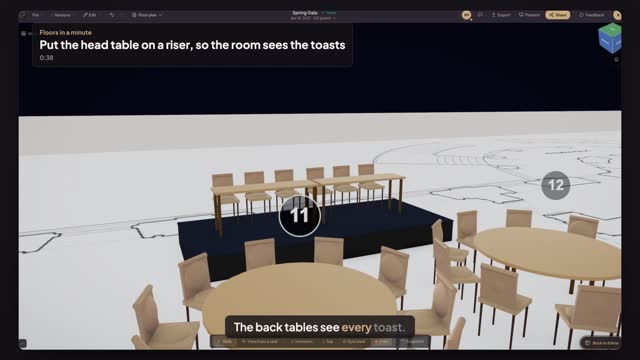
Place a Band Riser from AV, size it and set its Height, then drag the table onto it. Anything standing on a riser or stage is lifted to its top in 3D, so you see the head table at its real height.
How high should a head-table riser be?
Twelve to sixteen inches is usual: high enough for the room to see faces over the front tables, low enough to step up safely without stairs. Above about two feet, add stairs and a railing. Check the riser's real deck heights with your staging company before you promise one.
How do I check the view from the back?
Open 3D and look from a back table, or use the seat view from a chair at the back. If heads still block the head table, raise the riser a few inches or move the front tables apart. Save the view so the client sees the same angle.
Transcript
The back tables see every toast.
A head table at floor level disappears behind the front rounds.
Pick Band Riser and click the open strip at the end of the room.
Set the width to sixteen feet and the height to sixteen inches.
Pick Classroom Table and click twice on the riser, end to end.
Shift-click the first table and press R twice, so the chairs face the room.
Press Preview in 3D. The head table stands above the room.
Raised sixteen inches, in view from the very back.
Next: split the East Room with drape.